KOBIL Identity
Integrating KOBIL Identity for SuperApp's MiniApp provides developers with access to KOBIL's robust authentication system, enhancing the user authentication process. By utilizing KOBIL's authentication APIs, developers can enable Single Sign-On (SSO) functionality, allowing users to log in once to the SuperApp and seamlessly access multiple MiniApps without the need to repeatedly enter credentials.
This integration not only simplifies the user experience but also strengthens security measures by leveraging KOBIL's trusted identity verification mechanisms. By implementing OpenID or Identity integration, developers can enhance user engagement and retention rates, as users are more likely to interact with MiniApps that offer a convenient and secure authentication process.
OpenID Integration Requirements
OpenID Connect, also known as OIDC, is an identity protocol that leverages the authorization and authentication mechanisms of OAuth 2.0. You can obtain more information about OpenID from this link.
KOBIL Identity uses OpenID Connect protocol to share identity of the user logged in the SuperApp securely and easily.
The schema and the following steps below describe the process of implementing the KOBIL Identity and all prerequisites to start integration.
Process Overview
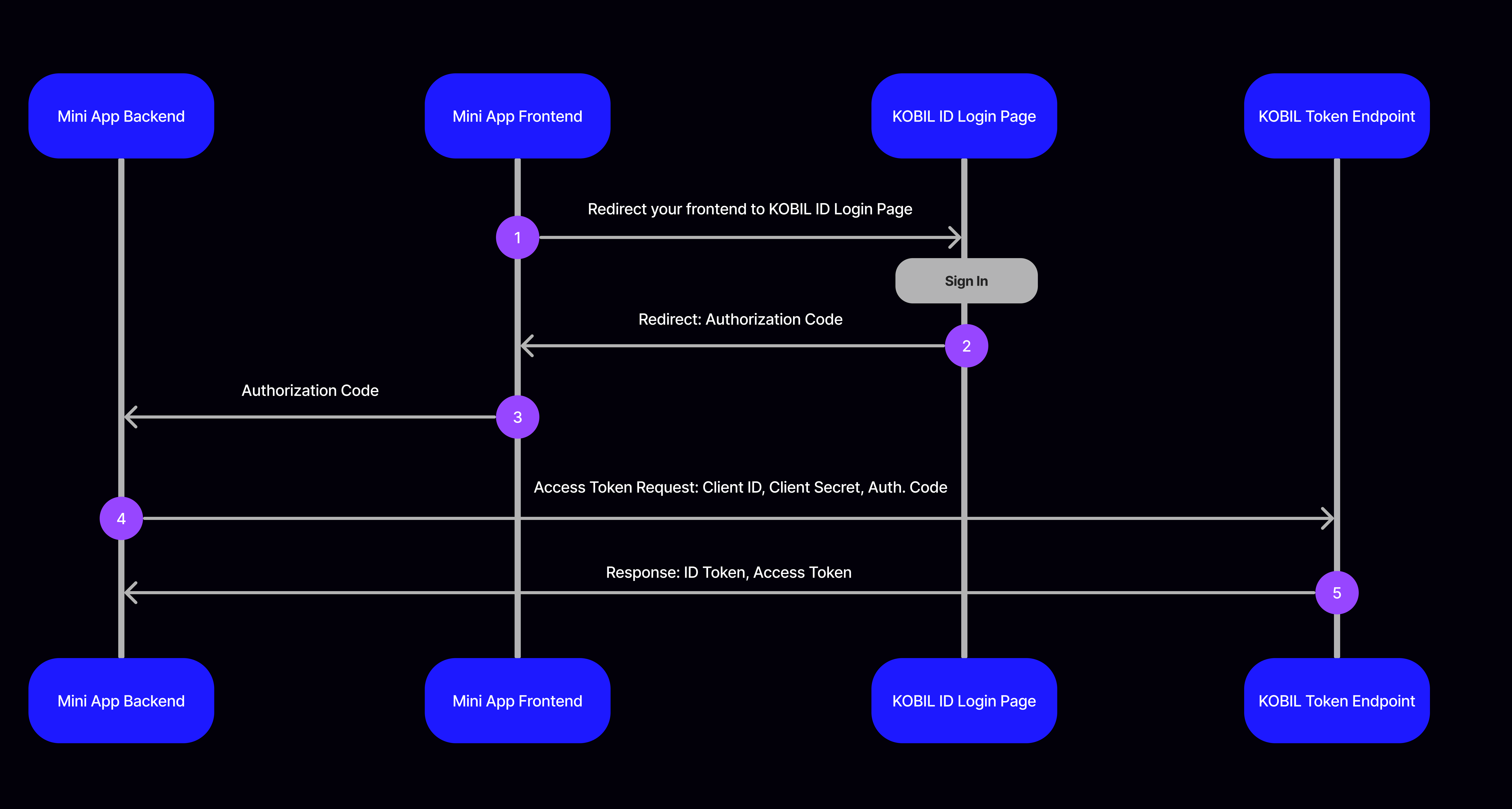
Kobil Identity shares user information with you in secure way. To access the user information logged in to the SuperApp, you should perform the following steps:
In Step 1, When a new user who is not logged in comes to your application, the user should be redirected to the KOBIL Identity Login Page, while passing the unique client ID associated with that particular application.
The KOBIL Identity Login address consists of the following parameters:
https://{AUTHORIZATION_ADDRESS}/protocol/openid-connect/auth?client_id={CLIENT_ID}&redirect_uri={REDIRECT_URI}&scope=openid&response_type=code&response_mode=query&nonce={NONCE}
Use below address for development purposes by adding your application address
instead of AUTHORIZATION_ADDRESS:
https://idp.cloud.test.kobil.com/auth/realms/{TENANT_NAME}/protocol/openid-connect/auth?client_id={CLIENT_ID}redirect_uri={YOUR_APPLICATION_ADDRESS}&scope=openid&response_type=code&response_mode=query&nonce=o3w1vsredlp
In Step 2, The authorization code (a one-time-use code) generated by KOBIL Identity is sent to your application address as query parameter (if response mode is query) through a predefined Redirect URI after user log in with his/her KOBIL Identity credentials If you have logged in before, the authorization code value will be sent to your application without seeing a login screen.
In Step 3, Your frontend application forwards the received authorization code value to your backend application.
In Step 4, Your backend application passes the authorization code, client id, client secret and redirect uri information to KOBIL Identity Token Endpoint.
In Step 5, When provided with the authorization code, Kobil Identity returns a json object containing short lifetime access token and id token, and also relevant information in response. You can access user information by decoding the incoming id token or access token.
Use Identity
MiniApps should not store user attributes locally; instead, they must always request them from the Identity Provider (IDP).
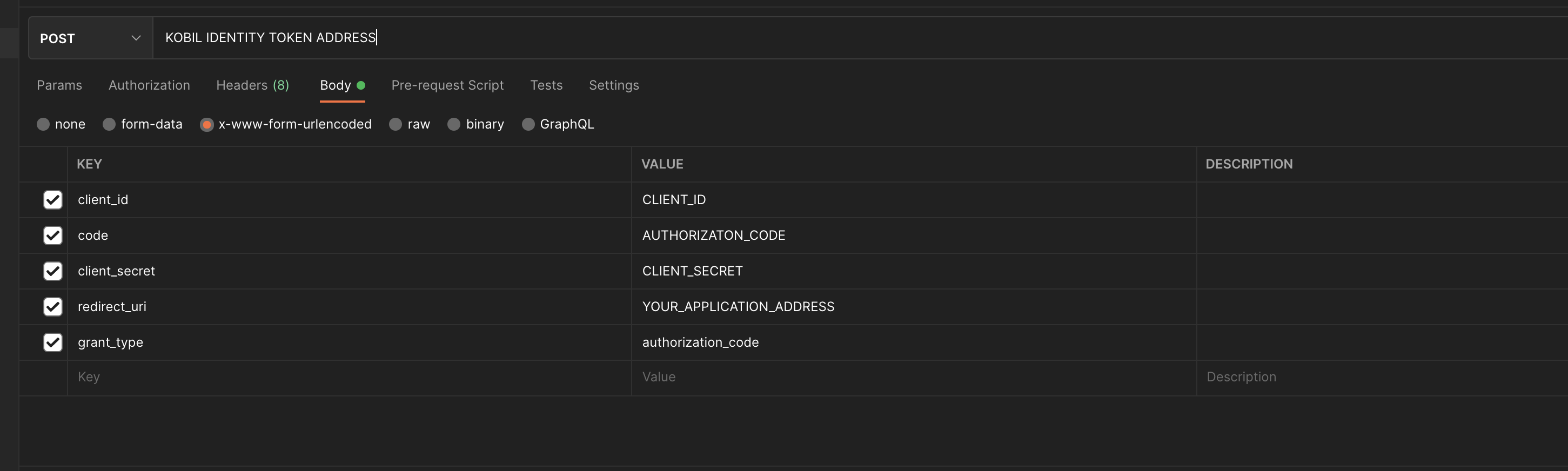
To get user information, make a POST request to this API with following
parameters.
POST
https://idp.cloud.test.kobil.com/auth/realms/{TENANT_NAME}/protocol/openid-connect/token
Content Type: x-www-form-urlencoded
Example Request Body:
{
  "client_id": {CLIENT_ID}
  "client_secret": {CLIENT_SECRET}
  "code": {AUTHORIZATION_CODE}
  "redirect_uri": {YOUR_APPLICATION_ADDRESS}
  "grant_type": "authorization_code"
}
| client_id | Client id of your application used when getting authorization code |
| client-secret | Secret value of that client id |
| code | Authorization code value that you obtain from KOBIL Identity |
| redirect_uri | Redirect address that you used when obtaining authorization code |
| grant_type | "authorization_code" |
Example Response Body:
{
  "access_token": "eyJhbGciOiJSUzI1NiIsInR5cCIgOiAiSldU...",
  "expires_in": 300,
  "refresh_expires_in": 1800,
  "refresh_token": "eyJhbGciOiJIUzI1NiIsInR5cCIgOiAiSldUIiwia2lkIiA6ICJiZmExM2RlNi02MjQwLTQ0NzYtYTU0NS02MDNjNTljNDRhMDIifQ…",
  "token_type": "bearer",
  "id_token": "eyJhbGciOiJSUzI1NiIsInR5cCIgOiAiSldUIiwia2lkIiA6ICJ4V1RCbFo5RmpjQ1puVmtJNTI3ZWtkcEx4Nm95SFJHMFNqblQyTUJ1Z3pZIn0...",
  "not-before-policy": 0,
  "session_state": "459cbb3d-5382-43c8-97db-dfdc91b87644",
  "scope": "openid"
}
API Reference
User Consent
User consent in KOBIL SuperApp refers to the explicit permission granted by an individual user for certain actions or activities performed by SuperApp as well as MiniApps. This consent is typically required for various purposes, such as accessing personal data, tracking location, sending notifications, or sharing information with third parties.
User consent is essential for ensuring transparency, trust, and compliance with privacy regulations, such as the General Data Protection Regulation (GDPR) in Europe or the California Consumer Privacy Act (CCPA) in the United States. It empowers users to make informed decisions about how their data is collected, used, and shared by SuperApp.
For example, if the app collects personal information for marketing purposes or shares data with third-party advertisers, it must obtain explicit consent from the user before doing so. This is only asked if the user is logging into SuperApp or entering a specific MiniApp for the first time.
⚠️ Before Continuing Please Check: MiniApps cannot request or ask for a consent. Through KOBIL IDP, it is decided whether this consent is enabled or disabled for MiniApps (clients).
Define Scope for User Consent
-
Use the provided scope parameter in the address to access different user attributes. Please find out your environment scopes / attributes from your SuperApp Admin.
-
Sample Authorization Address:
https://idp.cloud.test.kobil.com/auth/realms/{TENANT_NAME}/protocol/openid-connect/auth?client_id={CLIENT_ID}&redirect_uri={YOUR_APPLICATION_ADDRESS}&scope=openid%20phone_number%20birth_date&response_type=code&response_mode=query&nonce={random_string_for_security}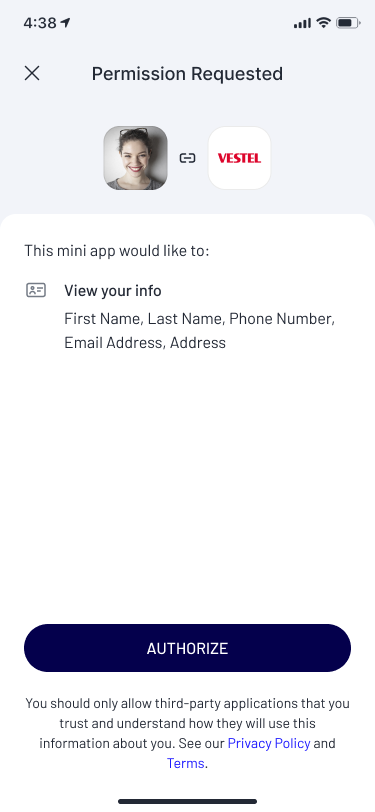
Please Verify Your Issuer URL
MiniApps must prove if the authentication token includes correct tenant.
After you decode your code, please check if the tenant you are requesting the authentication token from is the correct token.
{
  "access_token": "eyJhbGciOiJSUzI1NiIsInR5cCIgOiAiSldU...",
  "expires_in": 300,
  "refresh_expires_in": 1800,
  "refresh_token": "eyJhbGciOiJIUzI1NiIsInR5cCIgOiAiSldUIiwia2lkIiA6ICJiZmExM2RlNi02MjQwLTQ0NzYtYTU0NS02MDNjNTljNDRhMDIifQ…",
  "token_type": "bearer",
  "id_token": "eyJhbGciOiJSUzI1NiIsInR5cCIgOiAiSldUIiwia2lkIiA6ICJ4V1RCbFo5RmpjQ1puVmtJNTI3ZWtkcEx4Nm95SFJHMFNqblQyTUJ1Z3pZIn0...",
  "not-before-policy": 0,
  "session_state": "459cbb3d-5382-43c8-97db-dfdc91b87644",
  "scope": "openid email profile acr0",
  "acr": "0",
  "allowed-origins": ["https://example-app.web.app"],
  "amr": [],
  "aud": [
    "realm-management",
    "ks-management",
    "ast-services",
    "ks-users",
    "account"
  ],
  "auth_time": 1711623454,
  "azp": "b3428fac-064b-494a-b6b4-b528041279bc",
  "email": "john.doe@kobil.com",
  "email_verified": true,
  "exp": 1711623860,
  "expires_in": 300,
  "family_name": "doe",
  "given_name": "john",
  "iat": 1711623560,
  "iss": "https://idp.monaco-arabox-demo-s9wsi.midentity.dev/auth/realms/example-app",
  "jti": "bf810334-631a-434b-bc2f-9322778f3b51",
  "name": "john doe",
  "nonce": "57585039",
  "not-before-policy": 0,
  "preferred_username": "john.doe@kobil.com",
  "realm_access": {
    "roles": [
      "default-roles-example-app",
      "offline_access",
      "digitanium_user",
      "digitanium_admin",
      "uma_authorization"
    ]
  },
  "resource_access": {
    "account": {
      "roles": ["manage-account", "manage-account-links", "view-profile"]
    },
    "ast-services": { "roles": ["ast-client", "jwt-admin"] },
    "ks-management": {
      "roles": [
        "AstServicesAdmin",
        "WorkspaceOwner",
        "Admin",
        "WorkspaceMember"
      ]
    },
    "ks-users": { "roles": ["ast-client"] },
    "realm-management": {
      "roles": [
        "view-identity-providers",
        "view-realm",
        "manage-identity-providers",
        "view-claims",
        "impersonation",
        "realm-admin",
        "create-client",
        "manage-users",
        "manage-claims",
        "query-realms",
        "view-authorization",
        "query-clients",
        "query-users",
        "manage-events",
        "manage-realm",
        "view-events",
        "view-users",
        "view-clients",
        "manage-authorization",
        "manage-clients",
        "query-groups"
      ]
    },
    "sid": "57fb3d22-2984-4e18-a119-5aba7e9b0db4",
    "sub": "a2596dcf-6849-45f9-a94f-1b7ed6de83e2",
    "typ": "Bearer"
  }
}
sub -> userId
azp -> clientId
tenantName -> identify the last segment of the iss after the
final "/"
username -> preferred_username
Requirements
Client Id, Client Secret, User Information and Authorization Address
You can experience KOBIL Identity by using authorization address, user information and client credentials that described below. All this information is for development purposes. You must not use for production.
| Open ID Discover Endpoint | |
| Authorization Address | |
| Token Endpoint | |
| Username: | Your SuperApp/Workspace Username |
| Password: | Your SuperApp/Workspace Password |
| Client Id | Client ID of your Service created on Portal |
| Client Secret | Client Secret of your Service created on Portal |
General Information for OpenID Connect
openid scope, if there are additional scopes for the environment you are integrating, you can add them to request this user attributes.scopes: ["openid", "offline_access", "address", "microprofile-jwt", "email", "web-origins", "profile", "phone", "roles"]openidresponse_type specifies the type of response the client expects from the OP. The response_type parameter defines how the authorization code or ID token should be returned to the client after the user has been authenticated and granted consent.response_type parameter can take different values to indicate the desired type of response: code: This value indicates that the client is requesting an authorization code. The client will exchange this code for an access token and, optionally, an ID token. token: The client is requesting an access token directly in the response.["code", "none", "id_token", "token", "id_token token", "code id_token", "code token", "code id_token token"]response_mode is used for configuring how you achieve authorization code. query: In this mode, Authorization Response parameters are encoded in the query string added to the redirect_uri when redirecting back to the Client. (this can be used for most use cases) fragment: In this mode, Authorization Response parameters are encoded in the fragment added to the redirect_uri when redirecting back to the Client. form_post: In this mode, Authorization Response parameters are encoded as HTML form values that are auto-submitted in the User Agent, and thus are transmitted via the HTTP POST method to the Client.response_modes: ["query", "fragment", "form_post", "query.jwt", "fragment.jwt", "form_post.jwt", "jwt"]Using Client Credentials Grant for Machine-to-Machine Authentication
This section describes how to obtain an access token using the
client_credentials grant type. This OAuth 2.0 flow is primarily used for
service-to-service or backend communication where no end-user interaction is
required. It enables a MiniApp or backend service to authenticate itself
directly against the Identity Provider using its own credentials, such as
client_id and client_secret. This method is particularly suited for
automated, machine-to-machine API interactions, microservices authentication,
and backend services that need secure access without user involvement.
POST
https://idp.cloud.test.kobil.com/auth/realms/{TENANT_NAME}/protocol/openid-connect/token
Content Type: x-www-form-urlencoded
Client Authentication Methods
When using the Client Credentials grant, the client application must authenticate
itself using its own credentials. There are two supported and standards-compliant
ways to provide the client_id and client_secret.
1. Using Authorization Header
In this approach, the client credentials are sent via the HTTP Authorization header
using the Basic Authentication scheme.
Example Request Body:
{
  "grant_type": "client_credentials"
}
This body indicates that the client intends to authenticate itself without user interaction by using its own credentials.
Example Authorization Header:
Basic ODI0ZmRiYTktNjJiOC00YzBlLWIwYjUtNzE1M2I2ZmIyYWQ1OmI3MjJhMTMxLTkzYWEtNDcwYy05ODgyLTQyMWEzYTZjMmYzZA==
The Authorization header in this request follows the HTTP Basic Authentication
standard. To construct it, first concatenate your client_id and
client_secret using a colon (:) as a separator (e.g.,
client_id:client_secret). Then, encode this concatenated string using Base64.
The resulting Base64-encoded value must be prefixed with the word Basic
followed by a space. This method is recommended as it aligns with OAuth 2.0 best
practices and keeps client credentials out of the request body.
2. Sending Client Credentials in the Request Body
Alternatively, the client credentials can be sent directly in the request body
together with the grant_type.
Example Request Body:
{
  "grant_type": "client_credentials",
  "client_id":"fc6478a7-320f-40ca-9f90-4e3d2443f293",
  "client_secret":"439ef085-d16f-4543-baef-4c52634294f0"
}
In this approach, the Identity Provider extracts the client credentials from the request body instead of the Authorization header.
Example Response Body:
In case of a successful request, the API returns a JSON response similar to the following:
{
  "access_token": "eyJhbGciOiJSUzI1NiIsInR5cCIgOiAiSldUIiwia2lkIiA6ICI5WXlRSTAwQ29VR3pqOWlfUk45QXhvR1ZlZEZFci1ycDBWR2xfTXUyUzFBIn0.eyJleHAiOjE3MzAyNzY0MTYsImlhdCI6MTczMDI3NjExNiwianRpIjoiZjJlNDhjODctMWQ4My00MDcwLTg1NzctNDk5YzE5NTBkOTMxIiwiaXNzIjoiaHR0cHM6Ly9pZHAuY2xvdWQua29iaWwuY29tL2F1dGgvcmVhbG1zL2F2YWxvcWFwcCIsImF1ZCI6ImFjY291bnQiLCJzdWIiOiJiNTA3ZDc4ZS03OGY2LTQwZjItODNjNC0yM2IxZDEwYTM1OTQiLCJ0eXAiOiJCZWFyZXIiLCJhenAiOiI4MjRmZGJhOS02MmI4LTRjMGUtYjBiNS03MTUzYjZmYjJhZDUiLCJhY3IiOiItMSIsImFtciI6W10sImFsbG93ZWQtb3JpZ2lucyI6WyJodHRwczovL2tvYmlsLWNvbm5lY3QtbWluaWFwcC53ZWIuYXBwIl0sInJlYWxtX2FjY2VzcyI6eyJyb2xlcyI6WyJkZWZhdWx0LXJvbGVzLWF2YWxvcWFwcCIsImRpZ2l0YW5pdW1fdXNlciIsIm9mZmxpbmVfYWNjZXNzIiwidW1hX2F1dGhvcml6YXRpb24iXX0sInJlc291cmNlX2FjY2VzcyI6eyJhY2NvdW50Ijp7InJvbGVzIjpbIm1hbmFnZS1hY2NvdW50IiwibWFuYWdlLWFjY291bnQtbGlua3MiLCJ2aWV3LXByb2ZpbGUiXX19LCJzY29wZSI6InByb2ZpbGUgZW1haWwgYWNyLTEiLCJlbWFpbF92ZXJpZmllZCI6ZmFsc2UsImNsaWVudElkIjoiODI0ZmRiYTktNjJiOC00YzBlLWIwYjUtNzE1M2I2ZmIyYWQ1IiwiY2xpZW50SG9zdCI6IjEwLjEwMC43MS4yMzIiLCJwcmVmZXJyZWRfdXNlcm5hbWUiOiJzZXJ2aWNlLWFjY291bnQtODI0ZmRiYTktNjJiOC00YzBlLWIwYjUtNzE1M2I2ZmIyYWQ1IiwiY2xpZW50QWRkcmVzcyI6IjEwLjEwMC43MS4yMzIifQ.K9mT6l2DES0tBeCyyhYkwbJYEwMygZ3Ea1fI_ic0hVIgwmm8oZIudu92Fh5CPBYEcfPVN3sGXfae5OulW31IbInQuzkHgocuGb3ZqE7IjatWDRBaQlGWcSjXQZO1N_aEt75ubTARXSYJlrwn0RQeCo2pH3g1tYVrcOue5MYeYT3_5r9sibFGjnPg4gi5jNmlhCnue32uk-JGuIf_0l19JL5krG0s099e5qQd3oQXM1LkYwdWHfoVeKvXX2wucoihL3QBoQf0rnYStgEwviLwx2tyizdJnG4FASepgcsmyoeSwnsFhIT5g14BHTriUwMbZfkmAvo9igiq5TY9OpIrOQ",
  "expires_in": 300,
  "refresh_expires_in": 0,
  "token_type": "Bearer",
  "not-before-policy": 0,
  "scope": "profile email"
}
The access token is a JWT token that can be used to authenticate subsequent API
requests. The expires_in field indicates the lifetime of the access token in
seconds.