KOBIL Pay
Integrating the KOBIL Pay API into your MiniApps offers a transformative enhancement to the entire SuperApp ecosystem, significantly improving the user experience. With KOBIL Pay's one-click payment feature, customers can effortlessly complete transactions with just a single click, eliminating the hassle of lengthy checkout processes. This streamlined payment experience enhances convenience and efficiency, fostering increased customer satisfaction and loyalty.
It's important to note that access to the KOBIL Pay API is exclusively granted to MiniApp developers who have successfully completed KOBIL Identity integration and received access tokens. This ensures secure and authorized access to payment functionalities within the SuperApp platform, maintaining the highest standards of security and trust.
Process Overview
The process of making the Pay API integration can be handled in two steps. Making request to Pay API for creating, inquiring, canceling, or refunding a payment transaction then listen the result of these operations via your API.
- Use services to operate payment transactions
- Obtain your access token
- Use Pay APIs to create, cancel or refund a transaction
- Listen the result of transactions
- Prepare an Endpoint that receives the result of the transaction
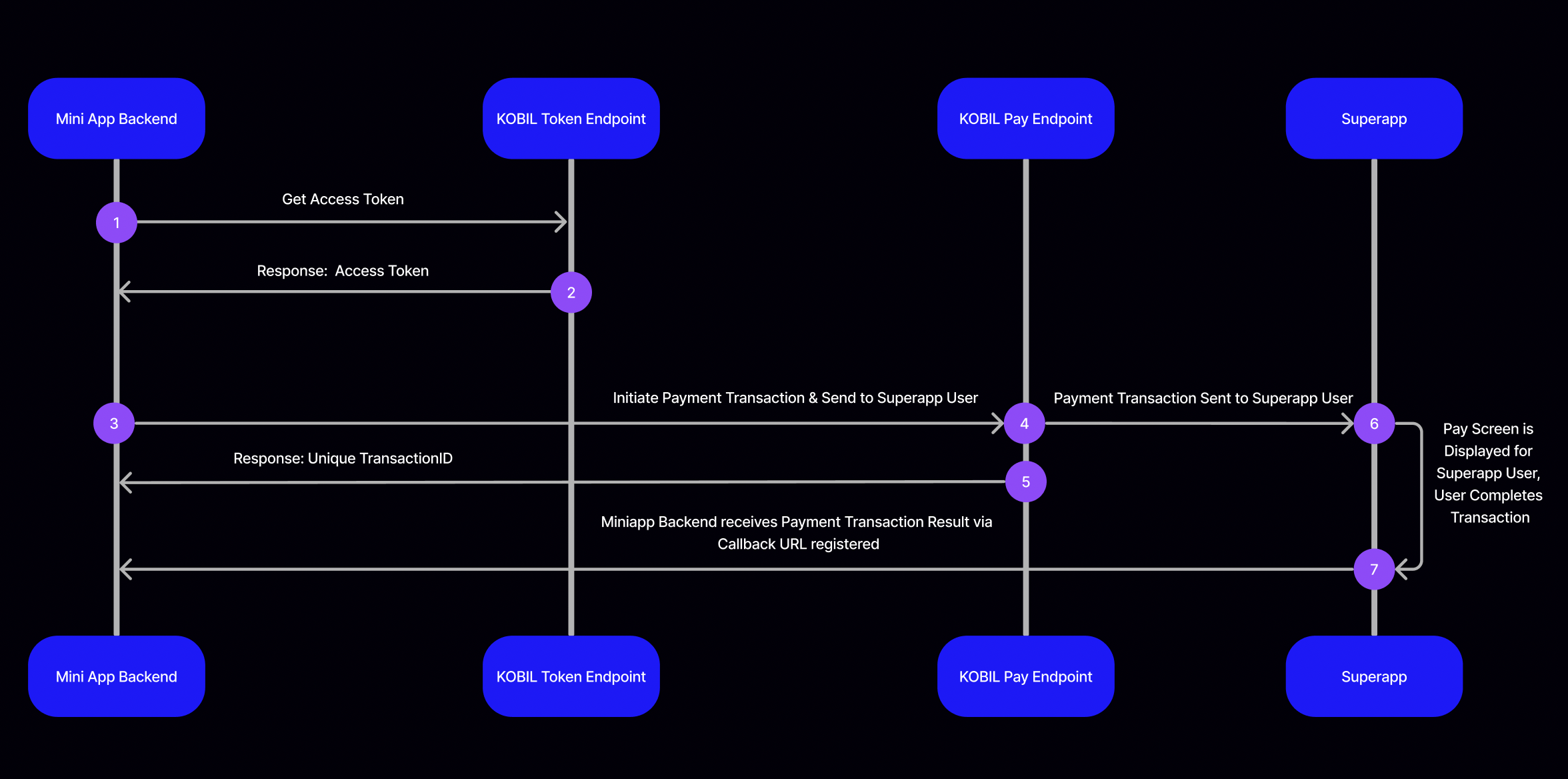
In Step 1, Your backend application passes username & password, client ID & client Secret information (given to you by SuperApp Admin) to KOBIL Identity Token Endpoint.
In Step 2, KOBIL Identity Token Endpoint returns a json object containing access token back to your backend application.
In Step 3, Your backend application can consume Pay API with the access token received in Step (2) and initiate payment transaction to send this transaction request to the SuperApp user. At the payment initiation (payment request), you will register callback URL and define payment amount and other parameters.
In Step 4, KOBIL Pay Endpoint will be intermediate layer to deliver the payment transaction request of your backend application to the SuperApp user.
In Step 5, in response of your request, KOBIL Message Endpoint will return a response including unique transactionID.
In Step 6, KOBIL Pay screen will be displayed for SuperApp user. SuperApp user completes the transaction.
In Step 7, when SuperApp user completes the transaction via Pay UI, your backend application will receive payment transaction result as shown in the example in our document. The result of the transaction is sent to the callback URL (merchantCallback) defined in step 3.
Use Pay API
Once you have completed the prerequisites, check out how to start, cancel, refund, and check the status transactions. To learn how we notify you when user interacts your payment service.
You can find details about the transaction operations below.
- Payment Transaction Initialization
- Post-Auth (Settle the Final Amount)
- Payment Transaction Status
- Payment Transaction Cancellation
- Payment Transaction Refundation
Retrieve Callback Message Upon User Transaction
When you make any operations like creating, canceling, refunding a payment transaction, all results of these operations will be delivered to you via your merchantCallback API address.
We notify you of all changes of transaction status via API call. We make request to your merchantCallback address that defined by you when making any transaction operation.
How It Works (Register Callback)
⚠️ YOUR ENDPOINT THAT NOTIFIED BY CHAT API MUST PROVIDE THE FOLLOWING MATTERS
Accepts POST RequestAccepts JSON BodyShouldn't ask for Authorization
Sample Request Sent by Pay API
{
  "transactionId": "f7f0ef2f-fa86-4865-85e6-e8e37fc7fc24",
  "operationId": null,
  "status": "finished",
  "message": "Payment complete.",
  "transactionStatus": "finished",
  "transactionMessage": "Payment complete.",
  "gateway": "creditCard"
}
Available Payment Transaction Statuses
Transaction status can be forwarded to you in one of the following situations. Please note that only finished status means the operation is successful.
| Status | Description |
| new | Newly created transaction status. This transaction will be completed and this statue will be changed with one of the other status. |
| processing | The transaction is being processed |
| processing_3d_secure | The transaction is being processed with 3D Secure |
| processing_digital | The transaction is being processed with digital processing |
| notification | Notification |
| finished | The transaction is completed successfully |
| cancelled | The transaction is cancelled with some reason (Reason will be send within message field) |
| closed | The transaction is closed with some reason (Reason will be send within message field) |
| timeout | Transaction is not completed in certain time |
| error | The transaction is failed with some reason (Reason will be send within message field) |
| void | The payment has been refunded.(Voiding can be made before the end of the day operations and all amount will be canceled.) |
| refund | The payment has been refunded. (Refunds can be made after the end of the day operations and partial or full refunds can be made.) |
Payment Transaction Initialization
You can initiate a standard payment transaction or a pre-auth transaction. To initiate a Pre-Auth transaction, include the field "paymentTenantType": "preAuth" in the request body.
To start a new payment transaction, make a POST request to this API.
POST
https://pay.cloud.test.kobil.com/mpay-merchant/create/transaction
Content Type: application/json
Regular Request
A standard payment transaction request used to immediately charge the user.
Example Request Body:
{
    "version": 1,
    "idempotencyId": "{{$randomUUID}}",
    "userId": "aca2fa51-bde8-4e83-becd-44bfde318dd8",
    "merchantId": "9f0022ae-8b0b-4165-a164-3ded334a7fe4",
    "merchantServiceUUID": "9f0022ae-8b0b-4165-a164-3ded334a7fe4",
    "merchantName": "ISPARK",
    "merchantCallback": "https://yourapi.com/payment-callback-address",
    "transactionTimeout": 11,
    "tenantId":"kurtis",
    "amount": 1300,
    "currency": "TRY",
    "paymentContent": [
        [
            {
                "key": "Service Amount",
                "value": "10.0 TL"
            }
            {
                "key": "Tax Amount",
                "value": "3.0 TL"
            }
        ]
    ]
}
Received Initiate Payment Transaction Response
When the user responds to your chat service as plain text, we will deliver this response to you via API. You can find sample request that delivered to your API below.
Sample Request Sent by Pay API
{
  "transactionId": "8f14f5e3-082b-4b03-95e8-8cfc1dbe882d",
  "operationId": null,
  "status": "finished",
  "message": "Payment complete.",
  "transactionStatus": "finished",
  "transactionMessage": "Payment complete.",
  "gateway": "creditCard"
}
Pre-Auth Request
A pre-authorization transaction that locks funds on the user's card but does not immediately collect payment, allowing final amount confirmation later via Post-Auth.
Example Request Body:
{
    "version": 1,
    "idempotencyId": "{{$randomUUID}}",
    "userId": "aca2fa51-bde8-4e83-becd-44bfde318dd8",
    "merchantId": "9f0022ae-8b0b-4165-a164-3ded334a7fe4",
    "merchantServiceUUID": "9f0022ae-8b0b-4165-a164-3ded334a7fe4",
    "merchantName": "ISPARK",
    "merchantCallback": "https://yourapi.com/payment-callback-address",
    "transactionTimeout": 11,
    "tenantId":"kurtis",
    "amount": 1300,
    "paymentTenantType": "preAuth",
    "currency": "TRY",
    "paymentContent": [
        [
            {
                "key": "Service Amount",
                "value": "10.0 TL"
            }
            {
                "key": "Tax Amount",
                "value": "3.0 TL"
            }
        ]
    ]
}
Received Initiate Pre-Auth Transaction Response
When the user responds to your payment, we will deliver this response to you via API. You can find sample request that delivered to your API below.
Sample Request Sent by Pay API
{
  "transactionId": "a18ee084-e4a4-40d8-925f-d1d96c52b5fa",
  "operationId": null,
  "status": "finished",
  "message": "Payment Successfully Completed",
  "cardGatewayType": "credit_sipay",
  "nextAction": "https://pay.gondor-shift-qa-fpl6t.gondor.dev.kobil.com/mpay-merchant/create/transaction/postauth?id=a18ee084-e4a4-40d8-925f-d1d96c52b5fa&idempotencyId=86aed463-4841-4383-ad1d-e44d69cb4899",
  "transactionStatus": "finished",
  "transactionMessage": "Payment Successfully Completed"
}
Common Example Response Body:
When you start a new transaction, Payment API will respond you by creating unique transactionId like below.
{
  "transactionId": "8f14f5e3-082b-4b03-95e8-8cfc1dbe882d",
  "operationId": null,
  "status": "new",
  "message": "Transaction created"
}
Payment Initiation Parameters
Request Parameters
| Field Name | Type | Description |
| idempotencyId | String | Random unique ID |
| userId | String | ID of the user to whom the payment will be made |
| merchantId | String | ID of the payment service |
| merchantServiceUUID | String | UUID (Client ID) of the payment service. It must be the same as merchantId. |
| merchantName | String | The name of the payment service |
| merchantCallback | String | The address where the payment result will come from |
| transactionTimeout | Integer | Payment expiry time (in minutes) |
| amount | Integer | How much the payment is (100 kuruş = 1 Turkish Lira(TL)) |
| currency | String | Payment currency ('TRY', 'EUR', etc.) |
| paymentContent | Array | Contents of the payment cart |
| paymentTenantType | String | Defines the transaction type |
Response Parameters
| Field Name | Type | Description |
| transactionId | String | ID of the payment transaction |
| status | String | It gives information about the status of the process. Other status examples; 'new': newly started, 'finished': completed, 'cancelled': operation canceled, 'closed': transaction closed, 'timeout': timed out, 'void': operation invalid, 'error': operation failed they mean that. |
| message | String | It contains a detailed message about the transaction. |
Payment Transaction Finalization
The Post-Auth operation is used to finalize a pre-authorized payment. After a
Pre-auth transaction is successfully completed, Post-Auth allows the
merchant to confirm and collect the final amount from the user's payment method.
This is particularly useful in scenarios where the final payment amount may vary
(e.g., hotel stays, car rentals).
Before sending the Post-Auth request, in addition to the id and
idempotencyId we obtained from the nextAction url, the amount and
merchantCallback query params are added to the url and make a GET request to
this API.
GET
https://pay.cloud.test.kobil.com/mpay-merchant/create/transaction/postauth?id=a18ee084-e4a4-40d8-925f-d1d96c52b5fa&idempotencyId=86aed463-4841-4383-ad1d-e44d69cb4899&amount=40&merchantCallback=https://yourapi.com/payment-callback-address
Example Response Body:
{
  "operationId": "92ce97cc-ba0c-429c-bfae-fd11327f6dce",
  "status": "processing",
  "message": "PostAuth request in progress",
  "transactionId": "7d97c422-c291-49c6-b62c-9593e2d8e14c"
}
Received Post-Auth Transaction Response
When the user responds to your payment, we will deliver this response to you via API. You can find sample request that delivered to your API below.
Sample Request Sent by Pay API
{
  "transactionId": "511d9df3-04b2-4665-98bb-190daef025f3",
  "operationId": "97ea58dc-23b9-4643-875b-7588fabcbe8e",
  "status": "finished",
  "message": "Complete PostAuth transaction successfully",
  "cardGatewayType": "credit_sipay",
  "nextAction": null,
  "transactionStatus": "finished",
  "transactionMessage": "Complete PostAuth transaction successfully"
}
Payment Post-Auth Parameters
Request Parameters
| Field Name | Type | Description |
| id | String | Transaction ID |
| idempotencyId | String | Random unique ID |
| amount | String | The amount for PostAuth transaction. If omitted or 0, the full amount of the original payment is paid. |
| merchantCallback | String | The address where the payment result will come from |
Response Parameters
| Field Name | Type | Description |
| operationId | String | Unique ID for the PostAuth operation |
| status | String | Current status of the PostAuth request |
| message | String | Message about the request state |
| transactionId | String | ID of the original pre-authorized transaction |
Payment Transaction Status
You can check the current status of any initiated payment transaction. This is useful to verify the final state of the transaction if no callback was received or for reconciliation purposes.
POST
https://pay.cloud.test.kobil.com/mpay-merchant/create/transaction/status
Content Type: application/json
Example Request Body:
{
  "merchantId": "9f0022ae-8b0b-4165-a164-3ded334a7fe4",
  "merchantCallback": "https://yourapi.com/payment-callback-address",
  "transactionId": "8f14f5e3-082b-4b03-95e8-8cfc1dbe882d"
}
Example Response Body:
{
  "transactionId": "8f14f5e3-082b-4b03-95e8-8cfc1dbe882d",
  "operationId": null,
  "status": "inquiring status",
  "message": "Inquire status in progress"
}
Received Payment Transaction Status Response
When the user responds to your chat service as plain text, we will deliver this response to you via API. You can find sample request that delivered to your API below.
Sample Request Sent by Pay API
{
  "transactionId": "8f14f5e3-082b-4b03-95e8-8cfc1dbe882d",
  "operationId": null,
  "status": "finished",
  "message": "Payment complete.",
  "transactionStatus": "finished",
  "transactionMessage": "Payment complete.",
  "gateway": "creditCard"
}
Payment Status Parameters
Request Parameters
| Field Name | Type | Description |
| merchantId | String | ID of the payment service |
| merchantCallback | String | The result of the transaction will be forwarded to this address. |
| transactionId | String | The id of the payment transaction to be queried |
Response Parameters
| Field Name | Type | Description |
| transactionId | String | ID of the queried payment transaction |
| status | String | It gives information about transaction status. |
| message | String | It contains a detailed message about the transaction. |
Payment Transaction Cancellation (Void Transaction)
Cancellation (void) is used to cancel a payment transaction that was initiated but not yet finalized. Cancellation is usually only possible within the same business day.
POST
https://pay.cloud.test.kobil.com/mpay-merchant/create/transaction/void
Content Type: application/json
Example Request Body:
{
  "version": 1,
  "userId": "11111111111",
  "idempotencyId": "{{$randomUUID}}",
  "merchantServiceUUID": "9f0022ae-8b0b-4165-a164-3ded334a7fe4",
  "merchantCallback": "https://yourapi.com/payment-callback-address",
  "transactionTimeout": 60,
  "merchantId": "9f0022ae-8b0b-4165-a164-3ded334a7fe4",
  "paymentTransactionId": "ffb350c5-cb4a-4a83-be8e-cb86c7bc692a",
  "cancellationMessage": "Iptal"
}
Example Response Body:
{
  "operationId": "a196b70c-6303-4476-976f-c56b6f3ead87",
  "status": "cancellation",
  "message": "Cancel request in progress",
  "transactionId": null
}
Received Cancel Payment Transaction Response
When the user responds to your chat service as plain text, we will deliver this response to you via API. You can find sample request that delivered to your API below.
Sample Request Sent by Pay API
{
  "transactionId": "a196b70c-6303-4476-976f-c56b6f3ead87",
  "operationId": "a196b70c-6303-4476-976f-c56b6f3ead87",
  "status": "finished",
  "message": "Transaction is voided by merchant successfully",
  "transactionStatus": "finished",
  "transactionMessage": "Transaction is voided by merchant successfully",
  "gateway": null,
  "refundTransactionId": "a196b70c-6303-4476-976f-c56b6f3ead87",
  "paymentTransactionId": "8f14f5e3-082b-4b03-95e8-8cfc1dbe882d",
  "cancelStatus": "finished"
}
Payment Cancellation Parameters
Request Parameters
| Field Name | Type | Description |
| idempotencyId | String | Random unique ID |
| userId | String | ID of the user who will cancel the payment |
| merchantServiceUUID | String | UUID (Client ID) of the payment service. |
| merchantCallback | String | Its callback URL. |
| transactionTimeout | Integer | Payment expiry time (in minutes) |
| merchantId | String | ID of the payment service. It must be the same as merchantServiceUUID. |
| paymentTransactionId | String | ID of the payment you want to cancel. |
| cancellationMessage | String | Payment cancellation message. |
Response Parameters
| Field Name | Type | Description |
| transactionId | String | ID of the payment transaction |
| status | String | It gives information about the status of the 'cancellation' process. Other status examples; 'finished': means the cancellation process has been completed, 'closed': the cancellation process has been closed for some reason, 'timeout': the cancellation process has timed out, 'error': an error has occurred during the cancellation process, they mean that. |
| message | String | It contains a detailed message about the process. |
Payment Transaction Refundation
Refund is used to return part or all of a payment that was already captured. Refunds are processed after the payment has been finalized and settled.
POST
https://pay.cloud.test.kobil.com/mpay-merchant/create/transaction/refund
Content Type: application/json
Example Request Body:
{
  "version": 1,
  "userId": "aca2fa51-bde8-4e83-becd-37bfde318dd8",
  "idempotencyId": "{{$randomUUID}}",
  "merchantServiceUUID": "5df48364-3d95-4888-b8b4-a8c99324a8f6",
  "merchantCallback": "https://integration.cloud.kobil.com/v1/integration/connect/print",
  "transactionTimeout": 60,
  "merchantId": "5df48364-3d95-4888-b8b4-a8c99324a8f6",
  "merchantUserId": "5df48364-3d95-4888-b8b4-a8c99324a8f6",
  "paymentTransactionId": "fb6c0b42-3161-4851-82f0-e0df658b73ca",
  "cancellationMessage": "refund call",
  "amount": 5555,
  "currency": "USD",
  "merchantServiceProviderId": "5df48364-3d95-4888-b8b4-a8c99324a8f6"
}
Example Response Body:
{
  "operationId": "896d3a9a-feea-4aff-9203-39520d7bcb01",
  "status": "cancellation",
  "message": "Cancel request in progress",
  "transactionId": null
}
Received Refund Payment Transaction Response
When the user responds to your chat service as plain text, we will deliver this response to you via API. You can find sample request that delivered to your API below.
Sample Request Sent by Pay API
{
  "transactionId": "896d3a9a-feea-4aff-9203-39520d7bcb01",
  "operationId": "896d3a9a-feea-4aff-9203-39520d7bcb01",
  "status": "finished",
  "message": "Transaction is refunded by merchant successfully",
  "transactionStatus": "finished",
  "transactionMessage": "Transaction is refunded by merchant successfully",
  "gateway": null,
  "refundTransactionId": "896d3a9a-feea-4aff-9203-39520d7bcb01",
  "paymentTransactionId": "fb6c0b42-3161-4851-82f0-e0df658b73ca",
  "cancelStatus": "finished"
}
Payment Refund Parameters
Request Parameters
| Field Name | Type | Description |
| userId | String | The user id to which the refund will be made |
| merchantServiceUUID | String | UUID (Client ID) of the payment service. |
| merchantCallback | String | the address where the result of the payment refund will come |
| transactionTimeout | Integer | Payment expiry time (in minutes) |
| merchantId | String | ID of the payment service. It must be the same as merchantServiceUUID. |
| merchantUserId | String | ID of the payment service user. It must be the same as merchantId and merchantServiceUUID. |
| paymentTransactionId | String | ID of the transaction for which the refund will be processed |
| amount | Integer | How much the refund is (100 kuruş = 1 Turkish Lira(TL)) |
| currency | String | Payment refund currency ('TRY', 'EUR', etc.) |
| merchantServiceProviderId | String | ID of the payment service. It must be the same as merchantServiceUUID. |
Response Parameters
| Field Name | Type | Description |
| transactionId | String | ID of the transaction for which the refund was made |
| status | String | It gives information about the status of the 'payment refund' process. Other status examples; 'finished': means the refund process has been completed, 'closed': the refund process has been closed for some reason, 'timeout': the refund process has timed out, 'error': an error has occurred during the refund process, they mean that. |
| message | String | It contains a detailed message about the process. |
Troubleshooting
401 Unauthorized
{
  "error": "HTTP 401 Unauthorized"
}
This error occurs when you use an invalid access token. Access token could be invalid for one of below reasons
- The token you receive may not be valid for the service you want to access. The serviceUuid and clientId values you use must be equal to each other.
- The account from which you receive the token may not have sufficient privileges, in this case, you should contact the relevant system administrator.