KOBIL TMS
Integrating the KOBIL TMS API into your MiniApps offers a significant enhancement to the trust and security of transactions within your SuperApp ecosystem. By leveraging this API, users can easily verify the details and origin of transactions, instilling a high level of confidence and trust in the platform. The primary function of the KOBIL TMS execution is to authenticate users through a confirmation message, allowing them to accept or decline transactions securely.
Designed with efficiency and security in mind, TMS efficiently manages and streamlines various types of transactions, including device login and financial transactions, among others. It's important to note that access to the KOBIL TMS API is granted exclusively to MiniApp developers who have successfully completed KOBIL Identity integration and obtained access tokens, ensuring secure and authorized access to transaction functionalities within the SuperApp platform.
Process Overview
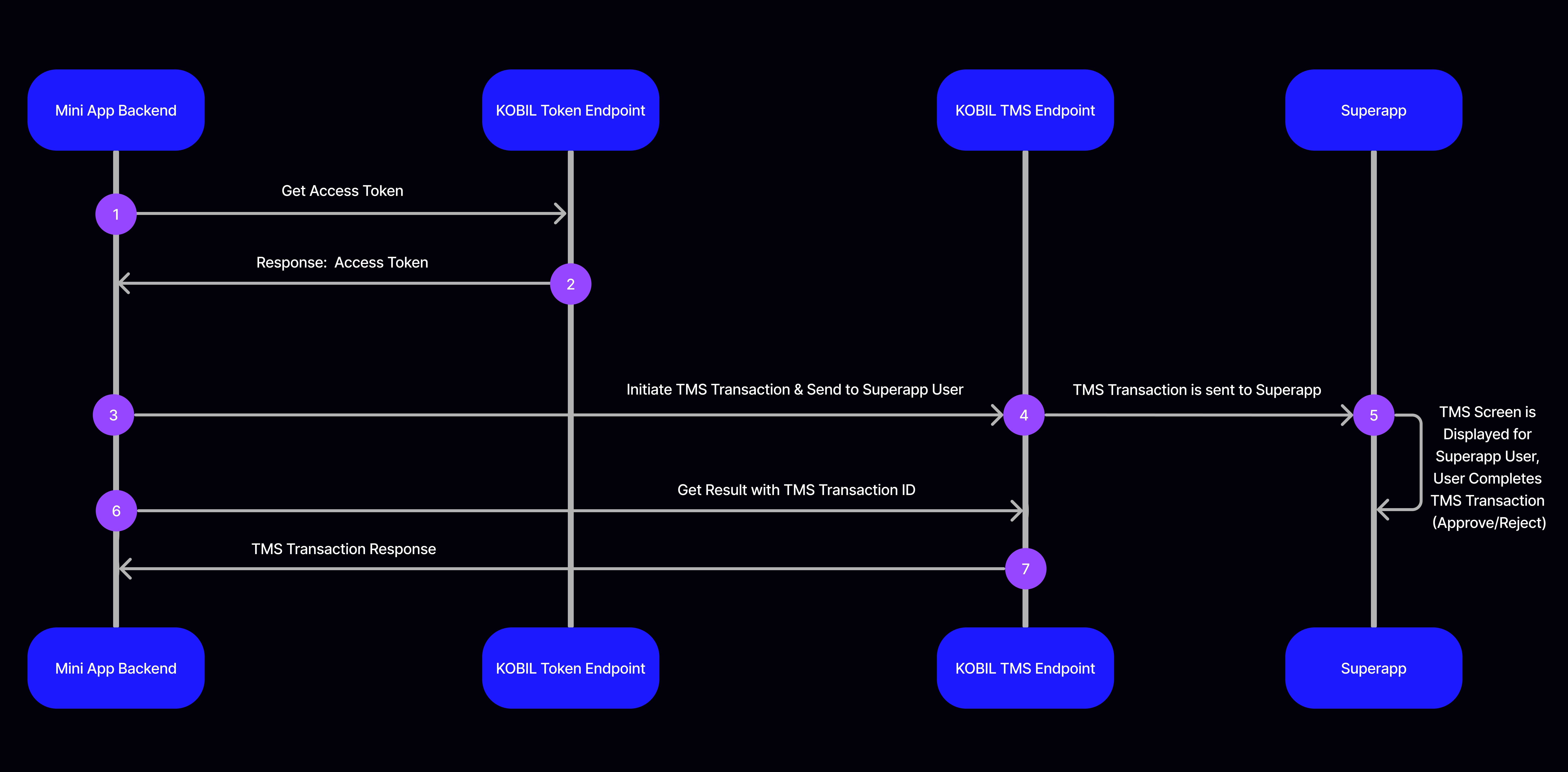
The process of integrating the TMS API can be handled in two steps. Making request to TMS API for initiating transaction for a user and taking the details of the available transaction.
Use TMS API
Once you have completed the prerequisites, check out how to initiate transaction for a user and take the details of the available transaction. Once you have completed the prerequisites, checkout how to start transaction and get transaction
You can find details about the transaction operations below.
Start TMS
To start a new TMS transaction, make a POST request to this API.
POST
https://asts.cloud.test.kobil.com/v1/tenants/{TENANT_NAME}/tms
Content Type: application/json
Example Request Body:
{
  "tmsData": {
    "text": "test TMS",
    "external": false,
    "data": {
      "key": "value"
    }
  },
  "retrievalTimeout": 50,
  "tmsTimeout": 40,
  "requireExplicitAuthentication": false,
  "requireFreshnessOfAuthentication": -1,
  "auditMessage": "test TMS auditMessage",
  "userId": "95ca7fb3-9916-4d0c-b910-43165c48d64e"
}
Example Response Body:
When you start a new transaction, TMS API will respond you by creating unique TMS like below.
{
  "id": "01JKT9ZRZT6Q2M0GC9JC1D6HTX",
  "status": "STARTED",
  "startedAt": "2025-02-11T10:48:26.875839577Z",
  "retrievalTimeout": 50,
  "tmsTimeout": 40,
  "userId": "aca2fa51-bde8-4e83-becd-37bfde318dd8"
}
Start TMS Parameters
Request Parameters
| Field Name | Type | Description |
| userId | String | The specified string value for a user to trigger the TMS transaction. |
| tmsData | Object | The data to send to the client(s). |
| retrievalTimeout | Integer | The time in seconds clients have to retrieve the TMS, default: 300. |
| tmsTimeout | Integer | The time in seconds that the clients have to answer to a TMS after retrieving it, default: 600. |
| requireExplicitAuthentication | Boolean | Whether answering the TMS requires excplicit authentication, per default false. |
| requireFreshnessOfAuthentication | Integer | The maximum age in seconds of the access token used for answering the TMS is set default: -1. |
| auditMessage | String | An optional message that is written as the audit detail message, default: unset. |
Response Parameters
| Field Name | Type | Description |
| id | String | This denotes the ID of the transaction. |
| status | String | The status of the API call. Refer Response status Information for details. |
| startedAt | String | This explains the time the transaction started. |
| retrievalTimeout | Integer | The time in seconds clients have to retrieve the TMS, default: 300. |
| tmsTimeout | Integer | The time in seconds that the clients have to answer to a TMS after retrieving it, default: 600. |
| userId | String | The users ID. |
Get TMS Status
To check the status of a transaction, make a GET request to this API.
GET
https://asts.cloud.test.kobil.com/v1/tenants/{TENANT_NAME}/tms/{TMS_ID}/status
Example Response Body:
{
  "id": "01K7E9HW9A3WE4HKVPD033937R",
  "status": "ACCEPTED",
  "startedAt": "2025-10-13T08:03:54.795458Z",
  "retrievalTimeout": 50,
  "tmsTimeout": 40,
  "userId": "aca2fa51-bde8-4e83-becd-37bfde318dd8",
  "retrievedAt": "2025-10-13T08:03:57.943856Z",
  "completedAt": "2025-10-13T08:04:02.112909Z"
}
Get TMS Status Parameters
Response Parameters
| Field Name | Type | Description |
| id | String | This denotes the ID of the transaction. |
| status | String | The status of the API call. Refer Response status Information for details. |
| startedAt | String | This explains the time the transaction started. |
| retrievalTimeout | Integer | The time in seconds clients have to retrieve the TMS, default: 300. |
| tmsTimeout | Integer | The time in seconds that the clients have to answer to a TMS after retrieving it, default: 600. |
| userId | String | The users ID. |
| retrievedAt | String | The time the transaction was retrieved. |
| completedAt | String | The time the transaction was completed. |
Get TMS Result
To get the result of a transaction, make a GET request to this API.
GET
https://asts.cloud.test.kobil.com/v1/tenants/{TENANT_NAME}/tms/{TMS_ID}/result
Example Response Body:
{
  "info": {
    "id": "01JSY6J8E3902QFAHYHE2GXYK9",
    "status": "ACCEPTED",
    "startedAt": "2025-04-28T12:39:46.884784Z",
    "retrievalTimeout": 50,
    "tmsTimeout": 40,
    "userId": "aca2fa51-bde8-4e83-becd-37bfde318dd8",
    "retrievedAt": "2025-04-28T12:39:47.986381Z",
    "completedAt": "2025-04-28T12:39:50.591243Z"
  },
  "signedData": "MIAGCSqGSIb3DQEHAqCAMIACAQExDTALBglghkgBZQMEAgEwFwYJKoZIhvcNAQcBoAoECHRlc3QgVE1ToIAwggJVMIIBuKADAgECAhABlnxkngGh2mmcZytL9WpwMAoGCCqGSM49BAMEMC8xEjAQBgNVBAsMCWF2YWxvcWFwcDEZMBcGA1UEAwwQYXZhbG9xYXBwLXNpZ25lcjAeFw0yNTA0MjgxMjM0NTFaFw0yNzA0MjgxMjM0NTFaMCAxHjAcBgNVBAMMFXl1bnVzLnN1c2FtQGtvYmlsLmNvbTBZMBMGByqGSM49AgEGCCqGSM49AwEHA0IABC7N1/LkaQ1LjFDCO9RynwXt4ujIMn56epAwNMWCW7TxR6priceW86I9RDc3Aos3DmvkfEczOFe448Jnnx7TamijgcQwgcEwcwYDVR0RBGwwaqQ4MDYxNDAyBgoJkiaJk/IsZAEBDCRhY2EyZmE1MS1iZGU4LTRlODMtYmVjZC0zN2JmZGUzMThkZDikLjAsMSowKAYKKwYBBAHxEW0CAQwaMDFKU1k2OFZFUjVNWTQwRVo0Q1lOUjlLWkgwDAYDVR0TAQH/BAIwADAOBgNVHQ8BAf8EBAMCBsAwFwYDVR0gBBAwDjAMBgorBgEEAfERbQEEMBMGA1UdJQQMMAoGCCsGAQUFBwMCMAoGCCqGSM49BAMEA4GKADCBhgJBezeVbGe0L9TekLU+eyrgo+9P88riDzR7FvGFZHtuP/Q2JrcFEPlpshPgW0uDDInIFEOhA987wrFksa/f2moDVRkCQVlU8HtSbTY9QEuQUhCi4h2y2lG9TR3ad7T44XaZm8IEBtvXK+/0yrSI9RFq1eCp1q5m2Y1X1WMEl4JQmNkUwE9HMIIC1TCCAjagAwIBAgIQAZECgNWx9j0g7QTTd1zjLTAKBggqhkjOPQQDBDBsMQswCQYDVQQGEwJERTEYMBYGA1UECAwPUmhlaW5sYW5kLVBmYWx6MQ4wDAYDVQQHDAVXb3JtczETMBEGA1UECgwKS09CSUwgR21iSDEeMBwGA1UEAwwVS09CSUwgU2hpZnQgSXNzdWVyIENBMB4XDTI0MDczMDA3MTgwM1oXDTI5MDczMDA3MTgwM1owLzESMBAGA1UECwwJYXZhbG9xYXBwMRkwFwYDVQQDDBBhdmFsb3FhcHAtc2lnbmVyMIGbMBAGByqGSM49AgEGBSuBBAAjA4GGAAQBoxqMY4u4tQrCEahZ0pUiYeofOkfYDNkU87BazILlSaWb0ehADnZjp7Y2R1clsPF9y2+EjgyzZfDru2rNnntsJ9UAQ0gXT5Pg577TW8XPVlDIuaYvJhhH9scdvGifsAff7OiEyXGvzU/znow0KF5TwoUXOmQ0creyg8uoc90qU8HhlvajgbMwgbAweQYDVR0gBHIwcDAMBgorBgEEAfERbQEAMAwGCisGAQQB8RFtAQQwDAYKKwYBBAHxEW0BATAMBgorBgEEAfERbQECMAwGCisGAQQB8RFtAQMwDAYKKwYBBAHxEW0BBjAMBgorBgEEAfERbQEHMAwGCisGAQQB8RFtAQgwEgYDVR0TAQH/BAgwBgEB/wIBADAOBgNVHQ8BAf8EBAMCAQYwDwYDVR0kAQH/BAUwA4ABADAKBggqhkjOPQQDBAOBjAAwgYgCQgDGXwYLRfBRz3s36hgnM+qyfHEChBLNiP6cnmr0EESjGjgGwwZIOKpc170dfPudPn1c1ZAdJbtizEZrVLZiq7QJsgJCAXpCvhP8B2VdYqM5XpqGYRy6TE2GkGFQEduh36MIyK5krOU5xI2D96E5ScC6+MyV6Qv6I+Gs6p/p9yB22cEhYzDvMIIDCjCCAmugAwIBAgIJAKIXyPDPXqwPMAoGCCqGSM49BAMEMGwxCzAJBgNVBAYTAkRFMRgwFgYDVQQIDA9SaGVpbmxhbmQtUGZhbHoxDjAMBgNVBAcMBVdvcm1zMRMwEQYDVQQKDApLT0JJTCBHbWJIMR4wHAYDVQQDDBVLT0JJTCBTaGlmdCBJc3N1ZXIgQ0EwHhcNMjMwMzI0MTEwMTMzWhcNMzMwMzIxMTEwMTMzWjBsMQswCQYDVQQGEwJERTEYMBYGA1UECAwPUmhlaW5sYW5kLVBmYWx6MQ4wDAYDVQQHDAVXb3JtczETMBEGA1UECgwKS09CSUwgR21iSDEeMBwGA1UEAwwVS09CSUwgU2hpZnQgSXNzdWVyIENBMIGbMBAGByqGSM49AgEGBSuBBAAjA4GGAAQAS/7ttuGhs3DESf30d6yqyvy2NFKZmSovN6lwqUaHU2YqT4sYrpvlv3sIPWbSQ1Nm2cc8pmliywzJpCHhf/foD0oAHU47baUKv26Jfm+CUsl3/QrMT01a2LD3oK4zg8kjCrOdpCCPDRlVsgjuAkp5C+DdusKtJdJARm+cTPUzs5EpNRGjgbIwga8wEgYDVR0TAQH/BAgwBgEB/wIBATAOBgNVHQ8BAf8EBAMCAQYwgYgGA1UdIASBgDB+MAwGCisGAQQB8RFtAQAwDAYKKwYBBAHxEW0BATAMBgorBgEEAfERbQECMAwGCisGAQQB8RFtAQMwDAYKKwYBBAHxEW0BBDAMBgorBgEEAfERbQEFMAwGCisGAQQB8RFtAQYwDAYKKwYBBAHxEW0BBzAMBgorBgEEAfERbQEIMAoGCCqGSM49BAMEA4GMADCBiAJCAeAKHM0mXwqJA08IL8ORd9qmSYTc0R2+BJUtL03tMBQaMvRWahkjqalCXvd3ByqRVp+5Nl7qhINys1nzhvOtdebIAkIBE6TzLZW/sn+DdZ/77GN360R9NbeFmLHSlydfSDxdIdAfGtB68iGgMHMh80s6jQlWZR/A/C/A+i4QUEBEGeNjw/4AADGCAakwggGlAgEBMEMwLzESMBAGA1UECwwJYXZhbG9xYXBwMRkwFwYDVQQDDBBhdmFsb3FhcHAtc2lnbmVyAhABlnxkngGh2mmcZytL9WpwMAsGCWCGSAFlAwQCAaCB9zAYBgkqhkiG9w0BCQMxCwYJKoZIhvcNAQcBMBwGCSqGSIb3DQEJBTEPFw0yNTA0MjgxMjM5NTBaMCoGCisGAQQB8RFtAwExHBYaMDFKU1k2SjhFMzkwMlFGQUhZSEUyR1hZSzkwKgYKKwYBBAHxEW0DAzEcFhowMUpTWTY4VkVSNU1ZNDBFWjRDWU5SOUtaSDAvBgkqhkiG9w0BCQQxIgQgunZCy257F7mNa63pgHci2eGkSPN6o/OcHB8GiupRg7owNAYKKwYBBAHxEW0DAjEmFiRhY2EyZmE1MS1iZGU4LTRlODMtYmVjZC0zN2JmZGUzMThkZDgwCgYIKoZIzj0EAwIESDBGAiEAjdXZeJwv3TcPzKHZ26/zDrx/Z5MWItih48JfVBU1P+8CIQDrk92iGPxsgJ0M7dVYIo3OUotAjiyj3auSG3uLzL3weQAAAAAAAA==",
  "completedBy": "01JSY68VER5MY40EZ4CYNR9KZH"
}
Get TMS Result Parameters
Response Parameters
| Field Name | Type | Description |
| id | String | This denotes the ID of the transaction. |
| status | String | The status of the API call. Refer Response status Information for details. |
| startedAt | String | This explains the time the transaction started. |
| retrievalTimeout | Integer | The time in seconds clients have to retrieve the TMS, default: 300. |
| tmsTimeout | Integer | The time in seconds that the clients have to answer to a TMS after retrieving it, default: 600. |
| userId | String | The users ID. |
| signedData | String | The generated signature in base64-encoded format. |
| completedBy | String | The signer ID. |
Troubleshooting
401 Unauthorized
{
  "error": "HTTP 401 Unauthorized"
}
This error occurs when you use an invalid access token. Access token could be invalid for one of below reasons
- The token you receive may not be valid for the service you want to access. The serviceUuid and clientId values you use must be equal to each other.
- The account from which you receive the token may not have sufficient privileges, in this case, you should contact the relevant system administrator.